
Click tracking on recommended items is what makes a recommendation placement measurable. Without it, you have no CTR, no position-bias signal, no A/B winner, no way to tell whether the engine is doing anything useful.
With it, you can read the interaction data, confirm the engine is firing as intended, and run real analysis on what your visitors click.
It doesn’t happen on its own. Bloomreach Marketing (Engagement) sends a recommendation event with action: 'serve' automatically when the engine returns items, but the click side is yours to wire up. Bloomreach’s recommendation integration documentation covers the pattern at a high level; the implementation is your call.
This manual shows one specific implementation: a JavaScript slider weblayer, mounted inline among other frontend components as natural page content via CSS position. The pattern itself is general, so adapt it to any placement where JavaScript can run: slider, grid, list, single card, inline block, widget, or any other frontend surface.
In the hotel example below, every click carries sixteen fields: six from the catalog, three from Bloomreach state, two from existing Visual Editor parameters, three computed from the DOM, two constants. No GTM, no dataLayer, no editor setup.
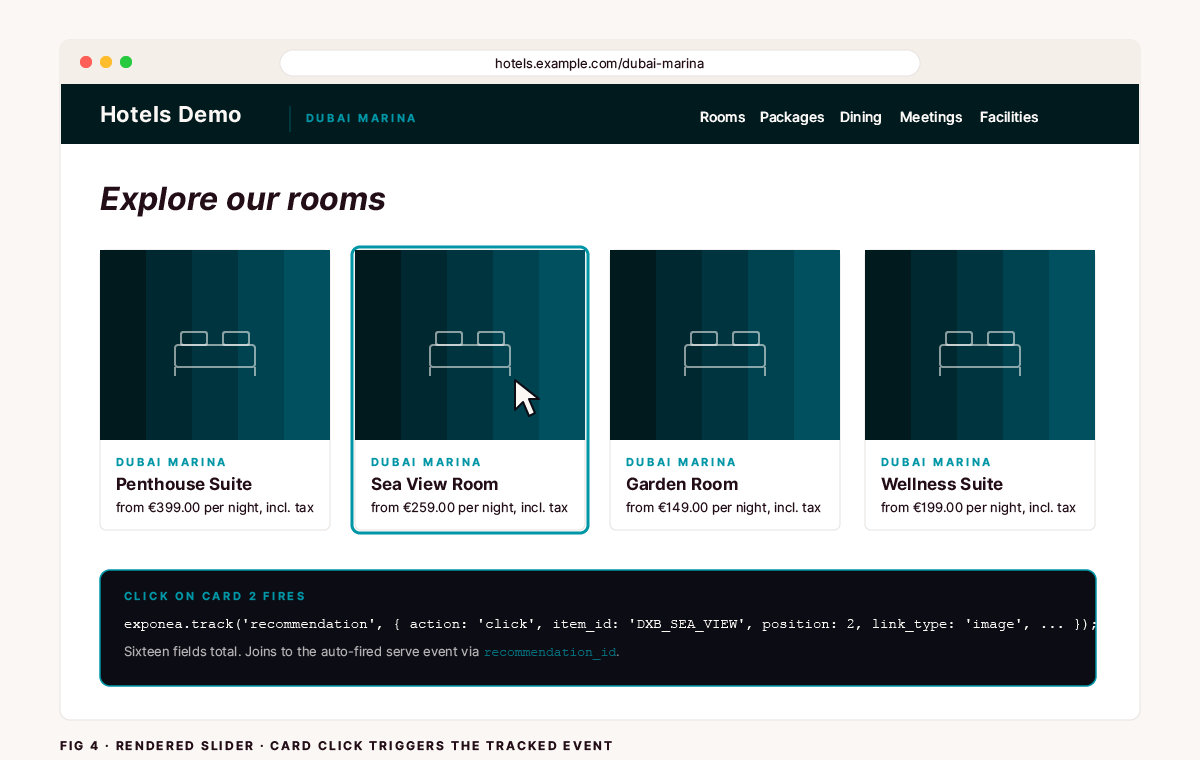
Fig 4 · Rendered slider · Card click triggers the tracked event
The situation
You’re using Bloomreach Marketing (Engagement) recommendations on a page. The format could be a slider, a grid, a vertical list, a single card, or an inline block. The HTML renders server-side via Jinja and [[recommendation : recommendation]]. The JS field mounts the placement.
Bloomreach fires a recommendation event with action: 'serve', listing every item_id returned and the recommendation_id it came from. The serve event also carries recommendation_name, AB-test variant info, and personalization counts. Useful for analysis, not needed for the click-side join.
A visitor clicks a card. The click event won’t fire on its own. Bloomreach’s recommendation integration documentation covers the pattern: bind a click handler on the cards and call exponea.track('recommendation', { action: 'click', ... }) with the right payload. The implementation is yours.
Without the click half, you can’t compute CTR. You can’t tell whether position 1 wins. You can’t compare A and B variants because there’s no per-placement attribution on the click side.
Most teams reach for GTM. Load GTM on the page, write a custom HTML tag that listens for clicks, push the payload to the dataLayer, fire another tag that sends it back to Bloomreach. Three layers, two tools.
GTM does buy you cross-tool fan-out, since the same click can feed GA4, Meta, or any other tag in one place, and if you already manage clicks that way, keep doing it.
The JS-field pattern below is the right choice when Bloomreach is the only consumer of the click event and you want tracking to live in the same artifact as the placement. The GTM alternative’s downside: tracking lives outside the platform the placement lives in, every new placement means more GTM work, and the JS field that already ships with the weblayer stays empty.
The two narrower alternatives: a Visual Editor parameter the editor types into for every placement, or data attributes sprinkled across the HTML. Both push the work onto the editor, and the second hits Bloomreach’s silent JS-field validation rules we’ll cover at the end.
There’s a simpler version that uses only the JS field.
The worked example below is a JavaScript slider weblayer built with Glide.js, because that’s the most common format we ship. The same pattern adapts to any other recommendation placement. Adaptation notes are in the last section before Troubleshooting.
Who should implement this
Anyone running Bloomreach recommendations in production. Without click attribution you can’t measure CTR, position bias, or A/B-test winners. Impressions fire automatically as action: 'serve'. Clicks need configuration.
The pattern below carries recommendation_id, weblayer_id, and weblayer_name on every click. You can split CTR by engine, placement variant, and surface in the same analysis, without per-placement editor configuration. For what this kind of instrumentation supports in production, see the Popsa case study, where measurement like this underpins 3x faster campaign production.
What this solves
Click attribution joinable to the auto-fired
serveevent viarecommendation_id.Per-item CTR via the catalog fields on each card. Native catalog field names, no renaming. In the hotel example, that’s per-room CTR (
item_id), per-hotel CTR (property_code), per-room-type breakdown (room_type). For your catalog, it’s whatever fields you put on the card.Per-placement CTR via
weblayer_idandweblayer_name, exposed by Bloomreach onself.dataasbanner_idandbanner_name.Position-bias measurement via a 1-based
positionfield plustotal_itemsfor context.Card-element CTR via
link_type. Distinguishes clicks on different parts of the card (image, item name, etc.). Lets you A/B-test card design.Page-placement segmentation via
placement_selectorandplacement_position, the CSS selector and insertion mode the placement was mounted with.Revenue analyses via
price(typed as a Number, not String) andcurrency.sum(price) where action='click'works in BR analyses without per-query casting.
What this doesn’t solve
Show events for the slider. Bloomreach already fires
serveautomatically when the engine returns items, and adding your own would double-count and break CTR.Cross-session attribution. Handled by Bloomreach’s customer/cookie ID, not by you.
Conversion tracking on the destination page. That’s the next event in the funnel (
view_item,purchase), not this one.Anything resembling a CDP strategy. This is one specific piece of telemetry plumbing.
Prerequisites
A recommendation placement on the page where JavaScript can run. The worked example below is a JavaScript slider weblayer that mounts client-side via
self.html, but the pattern adapts to grids, lists, single cards, inline blocks, widgets, or any other frontend surface where you can attach a click handler and callexponea.track().Access to both the HTML field (to add
data-*attributes Jinja will render onto each card) and the JS field. Both are a versioned pair after this. If you change one, redeploy the other.The
window.exponeaSDK loaded on the page. It’s part of every standard Bloomreach integration; you can confirm withtypeof window.exponea === 'object'in the browser console.Read access to the Bloomreach event explorer (Data & Assets → Data Manager → Event types) so you can verify events are landing.
Step 1: Add data attributes to the cards
Inside your weblayer’s HTML field, add six data-* attributes to each <li class="glide__slide"> block. The catalog field names map straight through. No renaming, no |lower filter. Match the catalog values exactly:
What each attribute carries:
data-item-id. Catalogitem_id, e.g.DXB_PENTHOUSE_SUITEwhereDXBis the property code,PENTHOUSEis the room ID, andSUITEis the type. Your catalog will have its own convention. Native uppercase format from the catalog.data-property-code. Catalogproperty_code, e.g.DXBfor the Dubai property in this example.data-name. Catalogname, the room name, e.g.Wellness Suite.data-property-name. Catalogproperty_nameraw, with theHotelprefix preserved if the catalog has it. Tracking sends the raw catalog value; the display-sideremoveHotelPrefixparameter that strips the prefix in the visible heading does not affect this attribute.data-room-type. Catalogroom_type(RoomorSuite, case-sensitive).data-price. Catalogpriceformatted with%0.2ffor canonical 2-decimal output (199.99, not199.9). Read as a Number in JS sosum/avgwork natively in analyses.
Step 2: Add the click handler
Inside your weblayer’s JavaScript field, add the function below at the bottom of the file, right before the entry-point requestAnimationFrame(createBanner) line.
What the code does, key points:
wrapper.addEventListener('click', ...)is a delegated listener on the slider’s outer container. One handler covers every card; no per-card binding to manage.The
closest('a.asteroad-...')filter ensures we only fire on actual link clicks inside the cards. Clicks on the price text or empty whitespace are ignored.link.closest('.glide__slide')finds the card the link belongs to. If the click somehow hits a link outside any card, we bail without firing.linkTypedistinguishes clicks on the image vs the hotel name vs the room name. Lets you analyze card design.Catalog fields come from
getAttribute('data-*')reads. The data attributes were rendered server-side by Jinja from{{ room.* }}, so no URL parsing or case-mapping is needed.parseFloat(priceRaw)converts the price from a string to a Number.getAttributereturns a string when the attribute is present andnullwhen it is missing, so the ternary above (priceRaw ? parseFloat(priceRaw) : null) handles the missing-attribute case beforeparseFloatever runs. Required sosum(price)/avg(price)work natively in BR analyses without per-query casting.Position is computed by iterating non-clone slides; the
:not(.glide__slide--clone)selector excludes Glide’s cloned-edge slides if you ever flip fromtype: 'slider'totype: 'carousel'.The defensive
charAt(0) === '[' && charAt(1) === '['check blanks the field if Bloomreach didn’t substitute the[[recommendation : recommendation]]placeholder for any reason. Two-character guard so any legitimate ID that happens to start with a single[survives. You never want the literal placeholder text leaking into analytics.The
try/catcharoundexponea.trackensures a tracking failure never breaks the slider itself. Tracking is best-effort; the user experience is not.
Step 3: Wire up the tracking constants
At the top of your JS field, immediately after var self = this; and the existing Placement constants (placementSelector and placementPosition), add four more. All auto-derived from Bloomreach state or hardcoded:
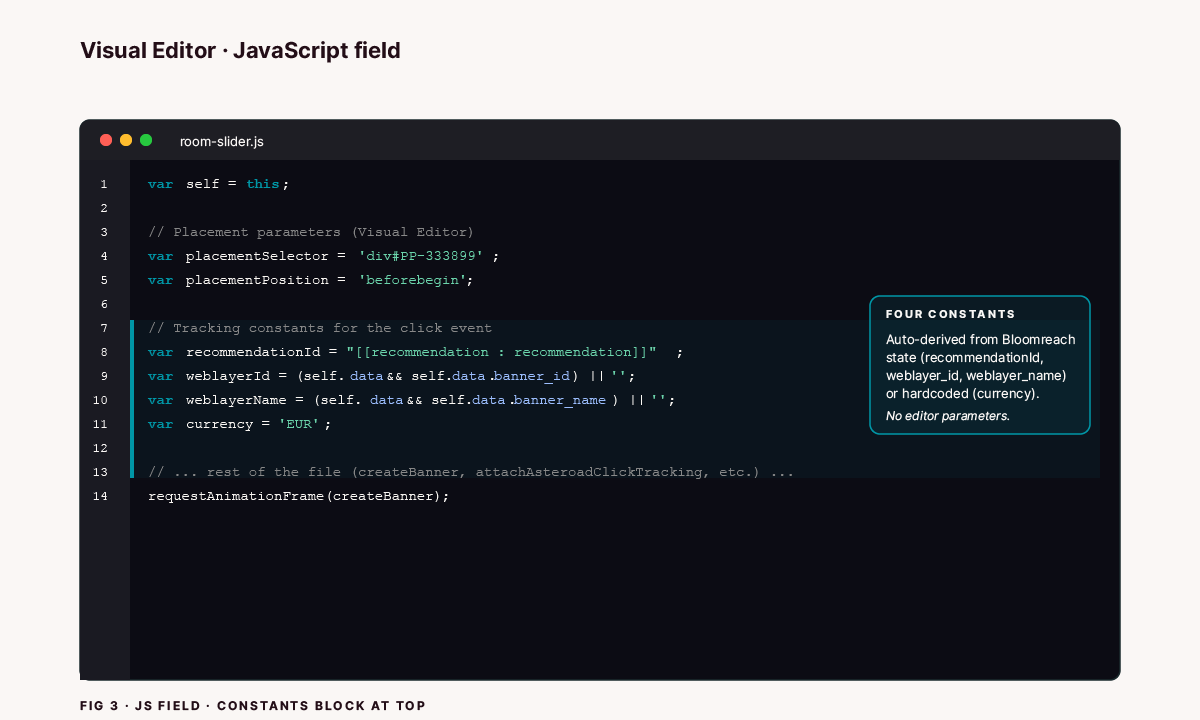
Fig 3 · JS Field · Constants block at top of file
What each constant does:
recommendationIdreuses the same[[recommendation : recommendation]]placeholder you already pick in the model dropdown for the HTML field’srecommendations(...)call. Bloomreach substitutes both occurrences with the chosen engine’s ID. The editor enters it once, in the dropdown, and it flows through to tracking automatically.
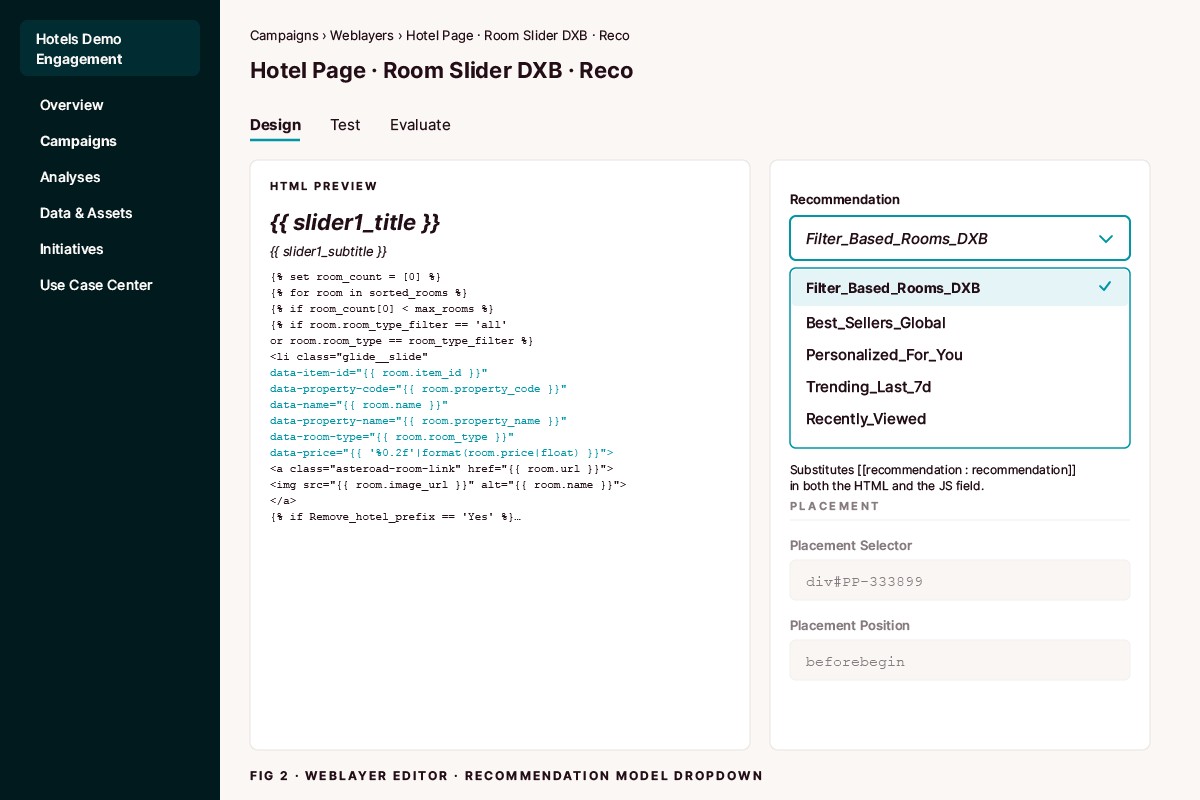
Fig 2 · Weblayer Editor · Recommendation model dropdown
2. weblayerId and weblayerName come from self.data.banner_id and self.data.banner_name. Inside a weblayer JS field, var self = this; binds to a context with seven keys: hostElement, inPreview, sdk, data, html, style, script. self.data carries every piece of weblayer metadata you’d otherwise have to ask the editor to type in. banner_name includes whatever name the editor gave the weblayer, which groups cleanly by variant in A/B reports.
3. currency is hardcoded as a JavaScript constant. The Dubai catalog in this worked example normalizes prices to EUR for unified reporting across properties, so price and currency always agree at the placement level. For a single-currency catalog where the storefront currency matches: change one constant if currency ever changes, with no editor parameter to forget about. For multi-currency catalogs where each item carries its own currency: expose this as a per-room data-currency attribute fed from a catalog field.
placement_selector and placement_position are already defined at the top of the JS as the existing Placement-category Visual Editor parameters that control where the slider mounts on the host page. The click event reuses them, so no separate tracking parameter is needed.
Step 4: Call the function once after slider init
Inside initializeSliders(), after the line that mounts the slider, add a single call:
That’s the whole client-side change. The function reads catalog values from the data attributes added in Step 1 and pulls the rest from self.data and the existing Placement parameters.
Tip on copying code into Bloomreach’s JS field. When you paste the JS into Bloomreach’s editor, copy it from a code editor or directly from the filesystem rather than from a chat client, Slack thread, or rendered web preview.
Markdown renderers can auto-detect dotted method calls (
Boolean.prototype.valueOf.call,e.Run,self.style) as URLs and wrap them in[text](http://text)autolinks. If that rendered text lands in the JS field, the autolink syntax is captured as JavaScript and the parser breaks.Command-line shortcuts that preserve file bytes verbatim, by platform:
cat your-weblayer.js | pbcopyon macOS;xclip -selection clipboard < your-weblayer.json Linux (requires xclip);Get-Content your-weblayer.js | Set-Clipboardin PowerShell on Windows.
Step 5: Verify in Bloomreach
Save and publish the weblayer. Hard-refresh (⌘+Shift+R) any page where the weblayer renders. Then:
Open DevTools and confirm
typeof window.exponea === 'object'. If it’sundefined, the SDK isn’t on the page and no tracking code can fix it.Click a card in the placement. The click opens the destination page in a new tab. The original tab stays alive long enough for
exponea.trackto deliver the event.In Bloomreach, navigate to the customer profile of whoever you’re testing as → Activity tab. Look for the most recent
recommendationevent withaction: 'click'. Bloomreach is near-real-time, so the event lands in the Activity tab within a few seconds to a minute of the click.Expand the event. You should see all sixteen fields populated:
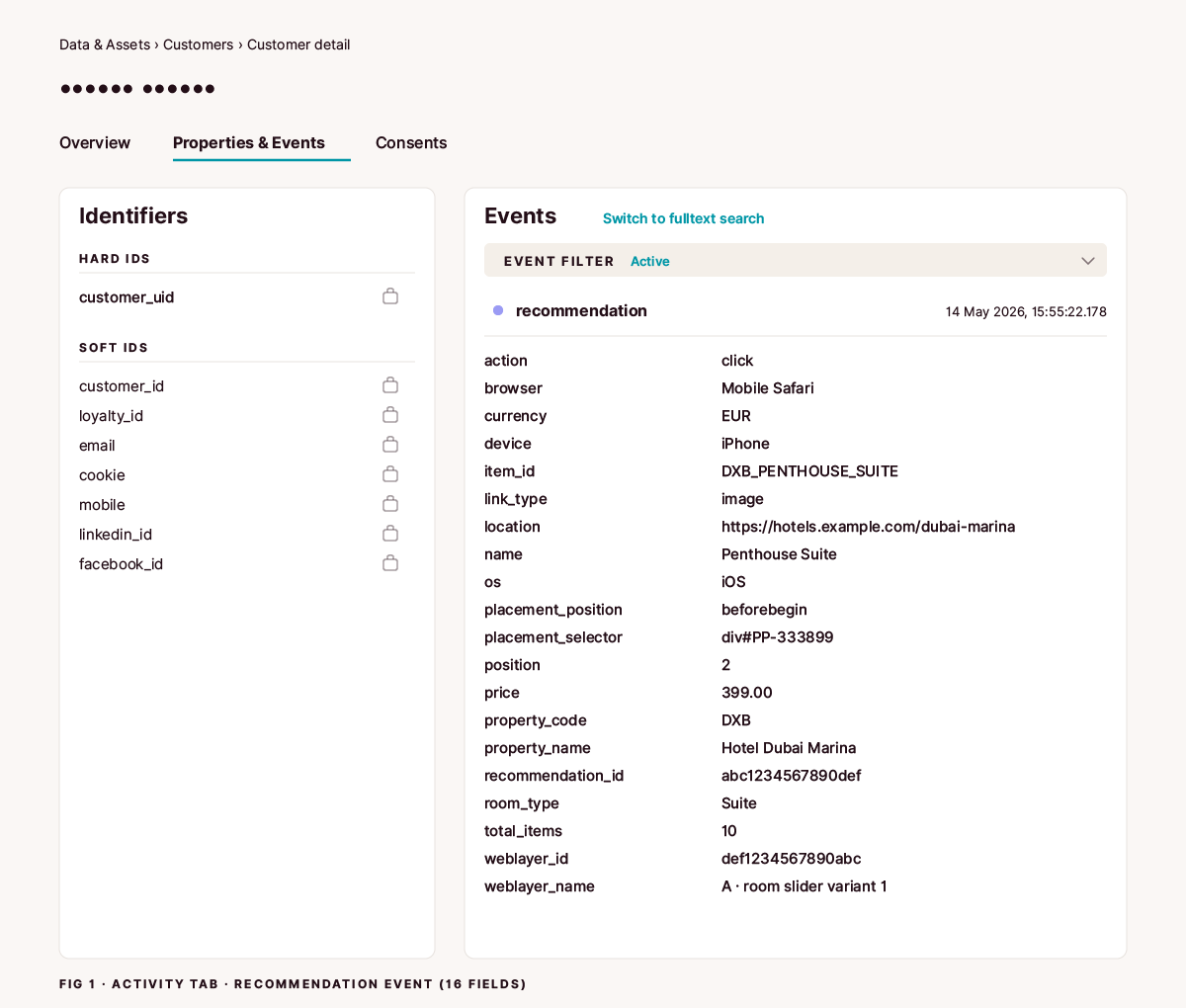
Fig 1 · Activity tab · Recommendation click event expanded with all sixteen fields populated
Plus the five or six fields Bloomreach attaches automatically: timestamp, browser, device, os, location, customer/cookie ID. That’s everything you need for CTR, position-bias, per-weblayer A/B reporting, per-room-type breakdowns, revenue analyses on clicked items, and card-element CTR. All from one canonical event joined to Bloomreach’s auto-fired serve.
Adapting to other recommendation formats
The worked example above is a JavaScript slider built with Glide.js. The same pattern works for any other Bloomreach recommendation placement. What changes per format:
Grid (CSS grid or flexbox cards). Drop the :not(.glide__slide--clone) selector. No Glide, no clones. Match cards by a .recommendation-card class (or whatever wrapper class your placement uses) instead of .glide__slide. Position is reading order: left-to-right within each row, top-to-bottom across rows.
Vertical list. Same as the grid case, only the CSS layout differs. Position is the top-to-bottom index.
Single card or next-best-item. The card is the only target. Drop the position computation entirely. Hardcode position: 1 and total_items: 1 if you want the field set to stay consistent across event types, or omit them.
Inline block (recommendation rendered directly into existing page content). The delegated listener attaches to whichever container element the placement renders into. The container ID is your contract with whoever owns the page markup. Position behaves like the grid or list cases.
Multiple placements on one page. Disambiguate via weblayer_id and weblayer_name. Both are already in the payload from self.data.banner_id and self.data.banner_name. Each placement carries its own recommendation_id from its own [[recommendation : recommendation]] placeholder. Reports split cleanly by weblayer_id with no extra work.
What stays the same across every format: the data-* attributes on the card, the delegated click handler, the constants block at the top, and the auto-derived fields from self.data and the existing Placement parameters. The pattern is the abstraction. The placement is the implementation.
Edge cases worth knowing
Same-tab navigation. The verify step assumes the link opens in a new tab (target="_blank") so exponea.track has time to flush the request before the page unloads. If your placement’s links open in the same tab, the in-flight beacon may be canceled by the navigation. Two fixes: either require target="_blank" on the card links, or call exponea.track and then defer navigation with a short setTimeout (~150ms) on preventDefault‘d click. The Bloomreach SDK does not currently expose a sendBeacon-style synchronous flush.
Consent and GDPR. exponea.track respects whatever consent state the Bloomreach SDK is initialized with on the page. If the visitor hasn’t consented to the tracking category, the SDK drops the call silently and no extra gating is needed here. If your consent setup requires explicit opt-in for behavioral tracking and you want the click event to ride that flag, gate the exponea.track call behind your own consent check before firing.
Multiple sliders sharing a wrapper ID. The handler binds to document.getElementById('asteroadSlidersWrapper'), which returns the first match. If two placements on the same page share that ID, only one slider’s clicks will be tracked. Either give each placement its own wrapper ID and pass it into attachAsteroadClickTracking(wrapperId), or scope the placements to mount on different page sections so only one wrapper exists at a time.
Troubleshooting
Bloomreach won’t save the JS field (red error icon, no useful message). You have a literal '[[' somewhere in the code. Bloomreach text-scans the JS field for [[ ... ]] parameter declarations before the JavaScript is parsed. The scanner is text-based: it doesn’t know whether the brackets are inside a string literal, a comment, or actual code.
If you write '[[' (an unmatched open) anywhere in your JS, Bloomreach will hunt for the matching ]] somewhere downstream, fail to parse a valid parameter, and reject the save. The fix is to never literalize [[:
The same applies inside JS comments. If your comment contains [[recommendation : recommendation]], Bloomreach substitutes it with the model ID before the JS reaches the browser. Sometimes harmless, sometimes weird; either way, don’t do it.
Click event not appearing in the Activity tab. Check three things in order. First, confirm typeof window.exponea === 'object' in DevTools. If it’s undefined, the SDK isn’t loaded and no tracking code will work. Second, confirm the click handler is attached: in DevTools, search the Elements panel for asteroadSlidersWrapper and check that it has an event listener for click. Third, check the browser’s Network tab for the track request firing on click. If the request fires but the event doesn’t appear in Bloomreach, the customer profile might be resolving to a different identity than the one you’re looking at.
price shows as a string in the event, not a Number. The data-price attribute in the HTML is always a string (that’s what getAttribute returns). The parseFloat() call in the click handler should convert it. If it’s still a string, the most common cause is an empty or non-numeric value in the catalog’s price field for that item. The if (isNaN(price)) price = null; guard should catch this and send null rather than NaN. Check the catalog entry for the item that has the wrong type.
position is always 0. The slide element that was clicked isn’t matching any of the non-clone slides in the wrapper. This happens when the slider uses Glide’s carousel mode and the clicked element is a clone slide. The :not(.glide__slide--clone) selector excludes clones from the position count, but the clone itself won’t match any original slide in the loop. The position will be 0. If you need position tracking on clone clicks, match by data-item-id instead of by DOM identity.
recommendation_id is empty. The [[recommendation : recommendation]] placeholder wasn’t substituted by Bloomreach. This happens when no recommendation model is selected in the weblayer’s model dropdown, or when the weblayer is previewed outside of a live scenario. The defensive charAt(0) === '[' check blanks the field intentionally. In production with a model selected, the substitution happens server-side before the JS reaches the browser.
Field names don’t match my catalog. The data attributes in Step 1 (data-item-id, data-property-code, data-name, data-property-name, data-room-type, data-price) use field names from a hotel catalog. Adapt these to your own catalog schema. The pattern is generic: render catalog fields into data-* attributes via Jinja, read them at click time with getAttribute, and send them as event properties. The field names should match your catalog exactly for taxonomy purity.
Summary
One delegated
clicklistener on the placement’s wrapper, one customrecommendationevent per click. That’s the pattern.Catalog fields flow from Jinja
{{ room.* }}(or whatever your catalog calls each field) intodata-*attributes on each card, then read viagetAttribute()at click time. Field names match the catalog exactly.priceis parsed to a Number withparseFloat()sosum/avg/min/maxwork in BR analyses.recommendation_id,weblayer_id, andweblayer_namecome from Bloomreach state automatically. No Visual Editor parameters needed.placement_selectorandplacement_positionreuse the existing Placement parameters.position,total_items, andlink_typeare computed from the DOM at click time.currencyis a hardcoded constant.No editor setup. The whole pattern lives in the JS field.
Bloomreach already fires the
action: 'serve'half. Don’t add your own show event.Never literalize
'[['in JavaScript inside a Bloomreach JS field.
Our Bloomreach consultants treat click tracking as part of shipping any recommendation placement.
Read next
Capturing GA4 Client ID in Bloomreach Marketing (Engagement). Identity plumbing that makes cross-tool journeys queryable, and that pairs naturally with the recommendation_id and weblayer_id you are now sending on every click.
Fix the Bloomreach Marketing (Engagement) SDK Double-Load Warning in GTM. If the SDK loads twice,
exponea.trackfires duplicate events. This manual covers the fix.Inline Images in Framer CMS Render at 600px. Here’s the Fix. The CSS fix that makes the four figures in this manual render at full column width. Required if your live site runs on Framer.
Campaign Evaluation: Don’t Be Scared, Be Smart. The campaign-evaluation discipline this kind of tracking enables.
WRITTEN BY

Jan Sacha
Co-Founder · Bloomreach Consultant
Bloomreach Marketing (Engagement) consultant, in his third year at Asteroad running daily CDP and marketing automation work for European clients. Former Exponea enterprise consultant and CEO of Digiline.


Rather have us set it up for you?
Every manual here comes from real implementation work. If you would rather hand it off, tell us what you are trying to set up. We will listen first. No pitch, no commitment.