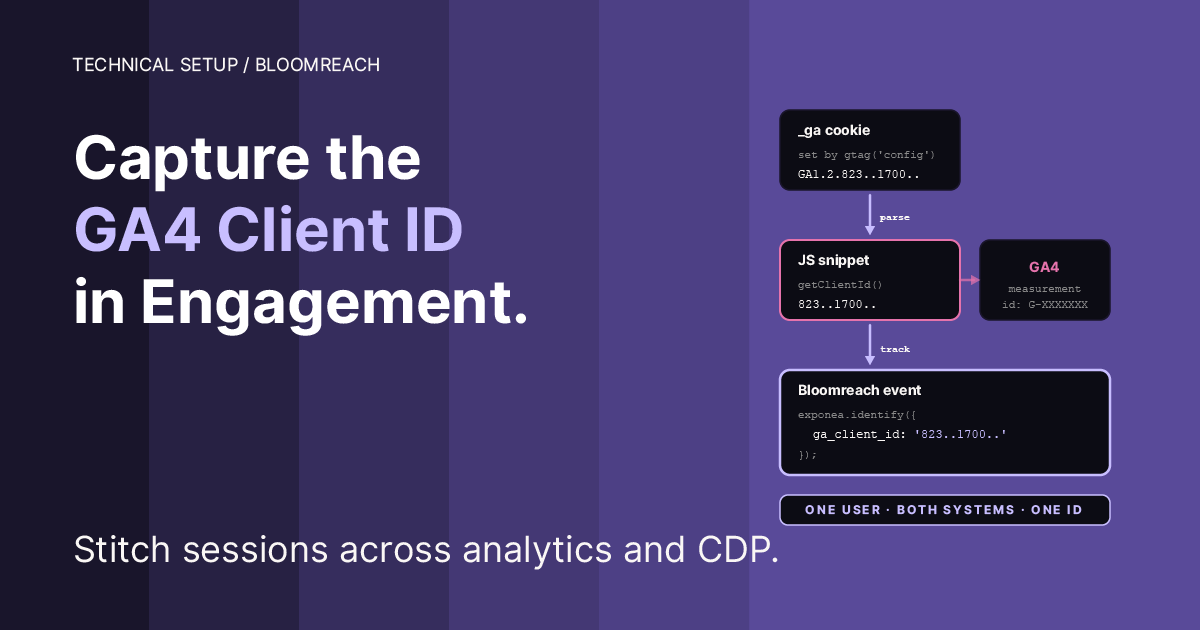
The legacy Track GA Cookies option doesn’t work on GA4-only sites. This is the modern replacement: explicit capture via GTM, written to a soft ID in Bloomreach Engagement, usable for cross-tool analysis, warehouse joins, and reverse event flow to GA4.
The situation
You’re running GA4 and Bloomreach Marketing (Engagement) side by side. Same visitors, same sessions, but nothing on the BR profile tells you which GA4 client ID belongs to which customer. That gap is where your warehouse joins go fuzzy, your reverse event flow to GA4 loses session attribution, and your analysts spend hours reconciling sampling differences by hand.
Bloomreach’s built-in Track GA Cookies option was supposed to close that gap. It was built for Universal Analytics, and on GA4-only sites it no longer works: the SDK polls for window.ga, times out after 5.5 seconds, and silently leaves the google_analytics soft ID empty on every profile. (If you see that polling error in your console, the companion manual covers disabling it.)
This manual picks up where that leaves off. Turning the legacy toggle off stops the error. Getting the capability back, a GA4 client ID on your BR profiles, is on you. This is the pattern.
Who should implement this
Not every Bloomreach client benefits equally. Three tiers.
Tier 1: modest value. Small or mid-sized sites, no active cross-tool analysis, GA4 and Bloomreach running side by side but not talked about together. Implementing this puts a value in a field nobody queries. Defensible hygiene, no measurable revenue impact. If you’re in this tier, implement it for future readiness or skip it without guilt.
Tier 2: real operational value. Retail, travel, media, subscription. You run marketing campaigns in BR and measure them partly in GA4. You occasionally cross-reference. With the client ID on the profile, you can reconcile GA4 and BR sampling differences, debug attribution discrepancies, and target BR campaigns using GA4 paid-channel attribution. Probably saves a few analyst-hours per month and improves campaign targeting marginally.
Tier 3: meaningful analytical and operational impact, which may influence revenue-driving decisions. Large retail, telcos, travel platforms, anyone with a data warehouse joining GA4 export and BR export, running reverse event flows into GA4 via Measurement Protocol, or building cross-platform attribution models. With the client ID as a shared key, warehouse joins become exact instead of fuzzy. Reverse event flow gets correct session attribution. Attribution modeling across tools becomes tractable.
Ask the client: do you join GA4 and BR data in a warehouse? do you send BR events back to GA4? do you run attribution models that span both systems? If yes to any, Tier 3. If you can see yourself wanting to, Tier 2. Otherwise Tier 1.
What the capture does and doesn’t solve
It does:
Stores the GA4 client ID as a soft ID on the BR customer profile
Allows warehouse-level joins between BR and GA4 BigQuery exports on a shared key
Enables sending BR events back to GA4 via Measurement Protocol with correct client attribution
Fixes the
google_analyticssoft ID slot so it’s actually populated on new profiles
It doesn’t:
Solve cross-device identity: the GA4 client ID is browser-scoped, lost when the user switches devices or clears cookies
Replace proper first-party customer ID infrastructure: for verified identity (email, account ID, phone), you still need those as hard IDs
Bridge older sessions: the capture starts working only from the moment you deploy it forward; existing profiles remain without the value
Automatically flow customer data between systems: this just stores an identifier; the actual data joining happens in your warehouse or pipelines
If a client expects the capture to magically unify their customer view, set expectations clearly. It’s one small, specific piece of identity plumbing, not a CDP strategy.
Prerequisites
Before implementing:
Bloomreach is already running on the site via GTM (or directly)
The
google_analyticssoft ID exists in the BR project’s customer ID schema (check: Data & Assets → Customers → Customer IDs: if it doesn’t exist, add it as a soft ID, type string)GA4 is loaded on the site and the
_gacookie is being setYou’ve already disabled the legacy Track GA Cookies option (the replacement and the legacy feature should not run simultaneously)
Your GTM container uses Consent Mode v2 and has a
cookie_consent_updatecustom event trigger: standard setup, see our cookie banner manual if not
Step 1: Create the capture tag in GTM
Create a new tag:
Name:
BR Engagement — Capture GA4 Client ID(or match your existing naming convention)Tag type: Custom HTML
HTML:
What the code does, line by line:
getCookieByName('_ga'), reads the GA4 first-party cookie. Returns a value likeGA1.1.1564508035.1720083105or empty string if not present.typeof window.exponea !== 'undefined', safety check. Prevents a runtime error if the BR SDK hasn’t loaded yet for any reason.ga.replace(/^GA\d\.\d\./, ''), strips theGA1.1.prefix so the stored value matches the format returned bygtag('get', 'G-XXX', 'client_id', cb). Keeps future compatibility if Bloomreach ever adds native gtag support.window.exponea.identify({ 'google_analytics': clientId }), writes the ID to thegoogle_analyticssoft ID slot on the current visitor’s profile.
Step 2: Triggers
Attach two triggers, OR’d (GTM’s default):
DOM Ready: fires on every page load. Catches returning visitors whose consent is already granted.cookie_consent_update: fires when a visitor makes a consent choice. Catches new visitors who just clicked Accept all.
GTM treats multiple triggers as OR. That’s correct here, you want the tag to run whenever either condition is satisfied, not both simultaneously.
Step 3: Consent settings
In the tag’s Advanced Settings → Consent Settings → Additional Consent Checks:
Require
analytics_storageto be granted
This is the safety net. Even if DOM Ready fires for a returning visitor who previously denied consent, the tag won’t execute. Don’t skip this, it’s what makes the tag GDPR-compliant.
Step 4: Tag sequencing
In the tag’s Advanced Settings → Tag Sequencing:
Check “Fire a tag before [this tag] fires”
Select your BR Engagement init tag (whatever it’s named, often
Exponea TagorBR Engagement — Init)Check “Don’t fire [this tag] if [BR init tag] fails or is paused”
This is critical. The capture tag calls window.exponea.identify(...) which requires window.exponea to exist. Without sequencing, GTM doesn’t guarantee which tag fires first when both match the same trigger. You’d lose some percentage of captures to race conditions.
The sequencing rule tells GTM: “always fire the BR init tag before this one, and if that fails, skip this one entirely.” Deterministic and safe.
Step 5: Bloomreach side: confirm the soft ID
The google_analytics soft ID needs to exist in the BR project’s customer ID schema for the capture to actually store a value. If the slot doesn’t exist, identify() succeeds silently but the value goes nowhere.
In the Bloomreach webapp:
Open your project
Navigate to Data & Assets → Customers → Customer IDs (or Project settings → Customer identification → Customer IDs on some tenant versions)
Scan the list for
google_analyticsIf present → done
If missing → add it. Name:
google_analytics, Type: string, Hard/Soft: Soft ID
A note on hard vs soft ID: keep it as a soft ID, always. The GA4 client ID is a browser-level identifier, not a verified identity. Two visitors on the same physical device (family members, office devices) can legitimately share a GA4 client ID. Promoting the slot to hard ID would merge their profiles into a single customer, which is data corruption. Soft ID attaches the value without forcing a merge, the correct behavior for auxiliary identifiers.
Step 6: Publish and verify
Save the tag in GTM
Preview the container: open Preview mode, load your site, accept consent, confirm in the Tag Assistant panel that both
[BR init tag]andBR Engagement — Capture GA4 Client IDshow as Fired, in that orderSubmit and Publish the container
Test in incognito, open the site in a fresh incognito window, accept consent, navigate around for 15 seconds
Verify in Bloomreach, find your own test profile (usually the most recently created anonymous profile, or search by your current cookie ID), check the Identifiers section. You should see
google_analyticspopulated with a value like434011958.1770614979
If google_analytics is populated, you’re done.
If it’s still empty after consent:
Check that the legacy Track GA Cookies option is actually turned off in the BR init tag. If both the legacy feature and this new capture are running, you can get interference.
Check that the
_gacookie exists after consent. In DevTools Console:document.cookie.includes('_ga='). If false, GA4 isn’t setting its cookie: that’s a separate consent or configuration issue.Check tag sequencing. In GTM Preview, confirm the BR init tag fired before the capture tag.
Check Additional Consent Checks. If the consent isn’t granted in the way the tag expects, the tag stays blocked.
One last thing: the GA Client ID cookie and Safari
The GA4 _ga cookie is set via JavaScript. Safari’s Intelligent Tracking Prevention caps JavaScript-set first-party cookies at 7 days. That means every 7 days of inactivity, a Safari visitor gets a new _ga cookie with a new client ID.
The capture still works (it reads whatever cookie exists), but the value rotates. If you’re building multi-session attribution or warehouse joins that span more than 7 days on Safari, the GA4 client ID alone won’t be stable enough. For that case, you need Bloomreach’s Custom Tracking Domain (CTD) to maintain a stable BR cookie across the 7-day gap, plus the capture pattern to link it to the current GA4 session. We’ve written a companion manual on CTD: Custom Tracking Domain in Bloomreach Marketing (Engagement).
Summary
Legacy Track GA Cookies option is broken on GA4-only sites (see the companion manual if you have the console error)
This is the modern replacement: GTM Custom HTML tag reading the
_gacookie, stripping the prefix, callingexponea.identify()against thegoogle_analyticssoft IDGate on
analytics_storageconsent, sequence after the BR init tag, use soft ID not hard IDVerify in an incognito session by finding the test profile in BR webapp and confirming
google_analyticsis populatedCombine with CTD if you need identity stability across 7+ days on Safari
This capture pattern is part of the identity work we do as a Bloomreach implementation partner.
Read next
Your Framer Cookie Banner Looks Compliant. It Isn’t.: the consent setup this capture depends on
Fix the Bloomreach Marketing (Engagement) SDK Double-Load Warning in GTM: the Custom Template + Consent Mode queue gotcha in the same GTM setup
The Bloomreach Marketing (Engagement) Console Error You Probably Don’t Know You Have: the legacy Track GA Cookies error this manual replaces
Custom Tracking Domain in Bloomreach Marketing (Engagement): how to make BR cookies survive Safari ITP
WRITTEN BY

Jan Sacha
Co-Founder · Bloomreach Consultant
Bloomreach Marketing (Engagement) consultant, in his third year at Asteroad running daily CDP and marketing automation work for European clients. Former Exponea enterprise consultant and CEO of Digiline.


Rather have us set it up for you?
Every manual here comes from real implementation work. If you would rather hand it off, tell us what you are trying to set up. We will listen first. No pitch, no commitment.