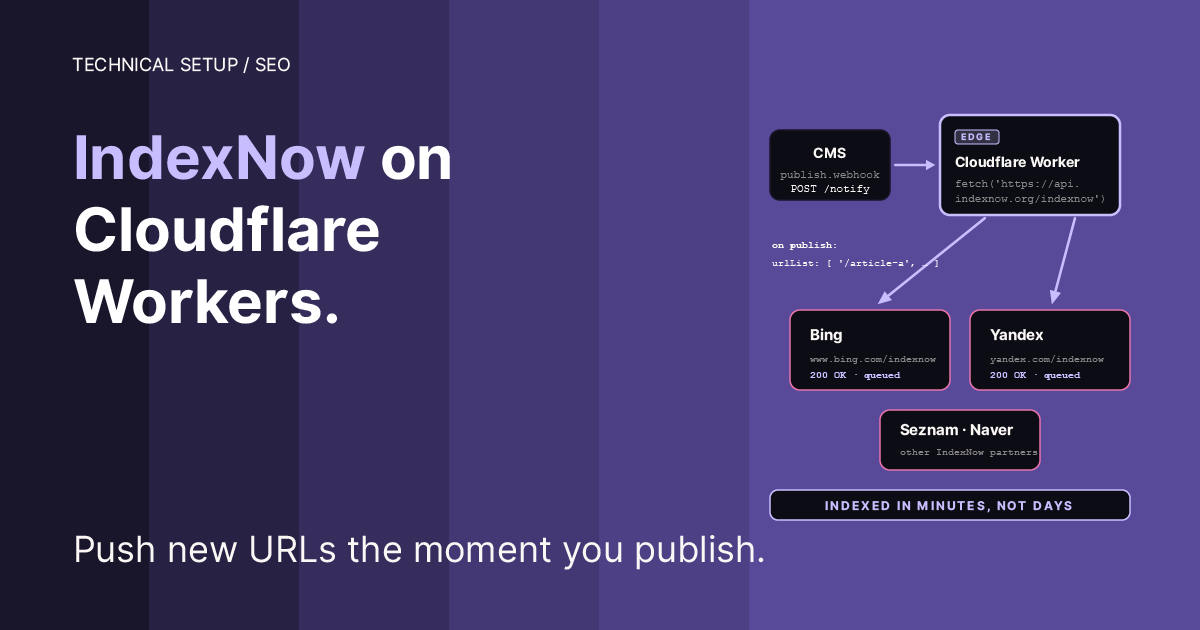
IndexNow setup with a Cloudflare Worker. No terminal required.
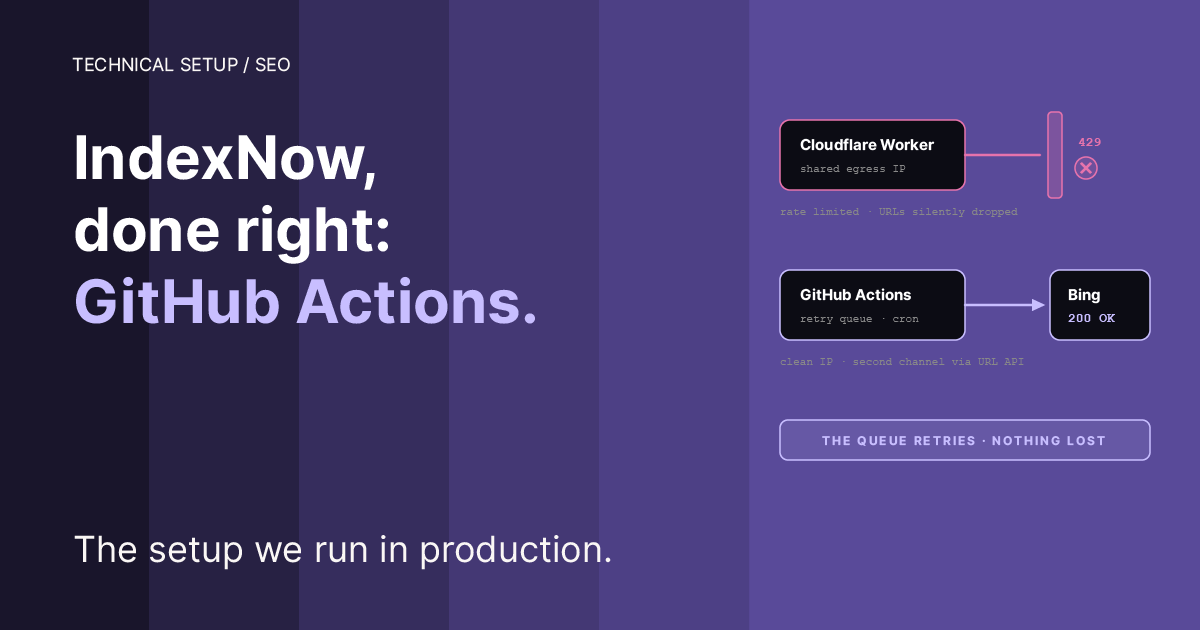
Update, July 2026. Two lessons from running this in production. First, the original code sample updated its sitemap snapshot even when IndexNow rejected the submission, which silently loses URLs on a bad day. The code below is fixed. Second, IndexNow rate-limits by IP, and Cloudflare Workers send requests from egress IPs shared with thousands of other Workers, so you can get
429 Too Many Requestseven at one request per day, and no code change fixes that. If your Worker keeps returning 429, read IndexNow on GitHub Actions: The Complete Auto-Submission Setup. It is the same pipeline moved to GitHub Actions, where it submits from clean IPs. And if you’re setting up IndexNow for the first time, that manual is also the better starting point: its setup includes a retry queue, endpoint fallback, and a second authenticated Bing channel from day one. This page remains the deeper explainer of how IndexNow itself works.
The problem
You publish a new page or blog post. You check Bing. Nothing. You wait a day, a week. Still nothing. Search engines discover new content by crawling your site on their own schedule, and that schedule can take days or weeks.
IndexNow is a protocol that lets you notify search engines the moment something changes. Instead of waiting for a crawler, you push the update directly. Bing, Yandex, Naver, Seznam, Amazon, and Yep all support it. Google is not part of the IndexNow protocol and uses a separate Indexing API.
How this works
Cloudflare has a native IndexNow integration called Crawler Hints. You turn it on in the dashboard and Cloudflare automatically notifies search engines when cached content changes. No code needed. If your site is proxied through Cloudflare (orange cloud on your DNS records), Crawler Hints may be all you need.
Most Framer sites are not proxied. Framer requires root A records to be DNS-only for domain verification, so Cloudflare never sees the traffic and Crawler Hints has nothing to detect. Framer does support reverse proxying through Cloudflare, but only on Scale and Enterprise plans. If you are on a standard Framer plan, Crawler Hints will not work for your site.
The Worker approach in this guide works regardless of your DNS setup or plan. It reads the sitemap directly from your site, compares it against a saved snapshot from the previous run, and submits only new or removed URLs to IndexNow.
The snapshot is stored in Cloudflare KV, a key-value storage service. You set it up once. After that, it runs daily on a cron schedule with no manual steps.
If you are on Framer, there are two extra DNS considerations. These are called out in the relevant steps.
What you need
Any website with a sitemap at
yoursite.com/sitemap.xmlA Cloudflare account (free plan is sufficient)
Your domain’s DNS managed by Cloudflare
If your DNS is not yet on Cloudflare, add your domain and update the nameservers at your registrar first. Worker Routes only work on domains managed through Cloudflare.
Step 1: Generate your IndexNow key
Generate a key: any alphanumeric string, 8 to 128 characters long, hyphens allowed. A UUID works. Quickest path: open any browser console and run crypto.randomUUID().replace(/-/g, ''). Save the key, you will need it several times in this guide. For the format spec see the IndexNow FAQ.
Your key will look like this: YOUR_INDEXNOW_KEY
Step 2: Create a KV Namespace
KV (Key-Value) is Cloudflare’s storage service. This is where the Worker saves its snapshot of your sitemap URLs between runs. On each run it compares the current sitemap against the snapshot and only submits what changed. This prevents submitting the same URLs to IndexNow every day.
In the Cloudflare dashboard go to Workers & Pages → KV
Click Create a namespace
Name it
SITEMAP_KVClick Add
Step 3: Create the Worker
Go to Workers & Pages → Create
Click Create a Worker
Name it
indexnow-yoursite(or any name you prefer)Select the Hello World template (Cloudflare requires a template, there is no blank option)
Click Deploy
Click Edit code
Select all existing code, delete it, and paste the following:
Replace yoursite.com in the first two lines with your actual domain.
Note on sitemap format: The regex parser works with flat sitemaps. If your site uses a sitemap index file (a sitemap that points to child sitemaps), the Worker will not follow the child URLs. Most Framer sites generate a single flat sitemap. If yours does not, you will need to add a step that fetches and parses each child sitemap.
Click Save and Deploy
Step 4: Bind the KV Namespace
Go to your Worker → Settings → Bindings → Add binding
Select KV Namespace
Variable name:
SITEMAP_KVKV Namespace: select
SITEMAP_KVClick Add Binding
Step 5: Add the IndexNow key as a secret
Go to Settings → Variables and Secrets → Add variable
Type: Secret
Variable name:
INDEXNOW_KEYValue: paste your IndexNow key from Step 1
Click Deploy
Step 6: Set up DNS and the Worker Route
IndexNow requires a verification file accessible at yoursite.com/YOUR_KEY.txt. The Worker already handles serving this file, you just need to route requests through it.
Framer shortcut: Framer can serve the key file natively, no Worker Route or DNS changes needed. In your Framer dashboard, open Domains → your domain → Files, click +, and upload a plain-text file named YOUR_KEY.txt containing just the key. Framer serves it at yoursite.com/YOUR_KEY.txt directly, and you publish for it to go live. This feature is on Pro, Scale, and Enterprise plans; on a Starter/free-tier site, skip it and use the DNS + Worker Route path below. Where this lives has moved before (it used to sit under Site Settings), so if the menu doesn’t match, search Framer’s help for "static files." If you do have access, skip the rest of this step entirely. The Worker then needs only the cron trigger, and the key-serving code in it never fires. This is what we do for asteroad.com now.
First, ensure you have a proxied record on your domain.
Worker Routes only intercept traffic that passes through Cloudflare’s proxy. You need at least one proxied (orange cloud) DNS record on your domain.
Most sites: your root A record is already proxied by default in Cloudflare, nothing to do here. Check your DNS records and confirm the orange cloud is on for yourdomain.com.
Framer sites: Framer requires root A records to be DNS only for its domain verification to work. This means Cloudflare cannot intercept requests on your root domain, and the Worker Route on the root will not fire. The fix is a proxied wildcard record:
Type: A
Name:
*Content: your Framer site IP (visible in Framer → Custom Domain → DNS records)
Proxy: orange cloud (proxied)
Check if this wildcard already exists in your Cloudflare DNS, if you migrated from another provider it may already be there. Framer rejects SSL connections for unclaimed subdomains, so no content can be served under your domain by anyone else.
Then add the Worker Route:
Go to Cloudflare → your domain → Workers Routes → Add route
Route:
yoursite.com/YOUR_KEY*Worker: select your Worker
Save
Verify it works by opening https://yoursite.com/YOUR_KEY.txt in your browser. It should return just the key string as plain text.
Step 7: Add the cron trigger
Go to Worker → Settings → Triggers → Cron Triggers → Add
Add:
0 12 * * *(runs daily at noon UTC)Save
For sites that publish multiple times per day, add a second trigger at 0 8 * * *. Cloudflare limits Cron Triggers at the account level: 5 on the Free plan, 250 on Paid.
Step 8: Test
Go to Worker → Observability → Begin log stream
Enable the
workers.devdomain under Domains & Routes if it shows as InactiveIn another tab open your Worker’s
workers.devURLCheck the logs, you should see a JSON response like this:
Status 202 means IndexNow received the submission and is still validating your key file. Once the key is validated, subsequent submissions return 200. Both 200 and 202 indicate success. Run the Worker a second time, you should see "submitted": "nothing changed", confirming the diff is working correctly.
If you see 429: that is IndexNow rate-limiting the IP address your request came from. On Cloudflare Workers that IP is shared with thousands of other people’s Workers, many also submitting to IndexNow. It is not your volume (one URL and ten thousand URLs cost the rate limiter the same: one request), and retrying, splitting batches, or changing your key won’t fix it. Thanks to the snapshot fix in the code above, a 429 day costs you nothing: the URLs are resubmitted on the next run. But if the 429s persist for days, the reliable fix is moving the submission off the shared IP pool. Read IndexNow on GitHub Actions: The Complete Auto-Submission Setup.
After testing, consider disabling the workers.dev domain again under Domains & Routes. Anyone who visits the URL triggers a full sitemap check, which is harmless but unnecessary.
How it works after setup
Every day at noon UTC the Worker:
Fetches your sitemap
Compares it against the KV snapshot from the previous run
Submits new and removed URLs to IndexNow
Updates the KV snapshot
On first run it submits everything. From the second run onwards it only submits what changed. If nothing changed, no request is sent to IndexNow at all.
When a page is removed from your sitemap, the Worker submits that URL to IndexNow. The search engine crawls it, finds the 404, and de-indexes it. There is no separate "deindex" call in the IndexNow protocol. This is the standard approach recommended by IndexNow.
This Worker tracks new and removed pages. It does not detect updated pages where the URL stays the same but the content changed. For platforms that include <lastmod> timestamps in their sitemaps (WordPress with Yoast, for example), the Worker could be extended to compare timestamps and submit changed URLs. Framer does not include <lastmod> in its sitemaps, so updated pages on Framer are re-crawled on the search engine’s normal schedule.
Running IndexNow across multiple hosts and subdomains
The Worker above handles one host. Many sites run more than one: a main domain plus tool subdomains, regional subdomains, a separate blog or docs host. IndexNow treats every host separately, and that includes every subdomain. example.com and tools.example.com are two different hosts to IndexNow. The single-host Worker above covers only one of them.
First, check whether each host needs IndexNow
IndexNow is for hosts with crawlable content that changes over time. A subdomain that’s a single-page app, a tool with no indexable content, or a host you don’t want indexed at all doesn’t need IndexNow. Check each host first: does it have a sitemap, does it have more than a handful of URLs, do those URLs change. If not, leave it out. Adding a host with nothing worth submitting is just noise.
The rule: one key file per host
Each host needs its own key file at its own root. https://tools.example.com/<key>.txt for tools.example.com, https://example.com/<key>.txt for example.com. The keyLocation parameter can move a key file to a non-root path, but only within the same host. It can’t point across hosts. You can’t verify tools.example.com URLs against a key file on example.com. And every URL in a single IndexNow submission must belong to the one host that submission declares.
This is the failure mode to watch for in multi-host setups. The Worker submits a subdomain’s URLs under the main domain’s host and key, IndexNow rejects them because the host doesn’t match, and nothing in the dashboard explains why. The submission looks like it worked.
Two ways to cover multiple hosts
One Worker per host. Clone the Worker for each host. Change SITEMAP_URL, INDEXNOW_HOST, and the INDEXNOW_KEY secret for each. Add a Worker Route and a key-file route on each host. Simple and fully isolated, but more Workers and more cron triggers to keep in sync.
One Worker, all hosts. Extend the Worker to loop over an array of host configurations. One Worker, one cron, every host handled in a single run. This is the cleaner pattern once you have three or more hosts.
The multi-host Worker
What changed from the single-host Worker:
HOSTSis an array. Each entry has its own host, sitemap URL, key secret name, and KV snapshot key.The
fetchhandler serves the key file for whichever host the request arrived on. It readsurl.hostname, finds the matching config, and returns that host’s key.The URL filter matches the exact hostname (
new URL(u).hostname === config.host), not just thehttps://prefix. This is the fix for the cross-host failure. A shared or mixed sitemap can list URLs for several hosts, and each submission must carry only the URLs that belong to its declared host.Each host gets its own submission, with its own
host,key, andkeyLocation, all matching.The
scheduledhandler loops over every host in one cron run. Each host call is wrapped in a try/catch so one host’s failure doesn’t stop the others.runHostalready returns error objects for expected failures (missing secret, sitemap down); the try/catch is the backstop for anything unexpected, so a corrupt KV entry or a parse error on the first host can’t silently skip every host after it.One KV namespace still serves all hosts. Each host writes to its own key inside it (
last_urls_main,last_urls_tools).
Routing and secrets for each host
For each host:
Add the host’s key as a separate secret (
INDEXNOW_KEY_MAIN,INDEXNOW_KEY_TOOLS, and so on) under Settings → Variables and Secrets.Add a Worker Route on that host so the key file resolves:
tools.yoursite.com/<that-host-key>*pointing at the same Worker. Each host needs its own route because the route includes that host’s key path.Confirm the host’s DNS is proxied through Cloudflare (orange cloud). A subdomain that’s DNS-only won’t pass traffic through the Worker, the same requirement as the single-host setup in Step 6.
Verifying the multi-host setup
For each host, open https://that-host/<that-host-key>.txt in a browser. It should return the bare key as plain text. If it 404s, the Worker Route for that host is missing or the key secret name doesn’t match the config. Then run the Worker manually and confirm the JSON response has a result block per host, each with the right URL counts and no host-mismatch error.
One caution on diagnosis: "submitted but not crawled" in Bing Webmaster Tools is the normal state for IndexNow, especially on a newer or low-authority site. IndexNow accelerates discovery; it does not force a crawl. A genuine key or host mismatch usually shows as a rejected submission, not as submitted-then-uncrawled. Confirm the submission status before assuming a key problem.
Cloudflare Crawler Hints: common questions
If you found this page searching for why Crawler Hints isn’t working, here are the answers in plain terms.
Is IndexNow on Cloudflare still active? Yes. Cloudflare’s Crawler Hints feature supports IndexNow and is generally available. It has not been deprecated.
I enabled Crawler Hints but Bing Webmaster Tools says IndexNow is not available. Why? Crawler Hints only works when your traffic is proxied through Cloudflare (the orange cloud on your DNS records). If your DNS records are set to DNS-only (gray cloud), Cloudflare never sees the requests, so it has nothing to detect and nothing to submit. Bing then sees no IndexNow activity. This is the single most common cause, and it is exactly the situation most Framer sites are in, because Framer requires root records to be DNS-only for domain verification.
Do I still need the IndexNow API if I use Cloudflare? Only if you cannot proxy your traffic through Cloudflare. If your site is fully proxied, Crawler Hints can do the job on its own. If it is DNS-only (again, most Framer sites), Crawler Hints has nothing to work with, and the Worker approach in this guide is the reliable path. It reads your sitemap directly and submits changes itself, regardless of DNS mode or plan.
I can’t find the Crawler Hints toggle. It lives under Caching → Configuration in the Cloudflare dashboard. If it appears grayed out or does nothing, check the proxy status of your DNS records first.
Cost
Everything in this guide runs on Cloudflare’s free plan:
Workers: 100,000 requests/day, one daily run uses 365/year
KV: 1 GB storage and 100,000 reads/day on free tier, a sitemap snapshot is a few KB and one read per run
Cron triggers: 5 per account on the Free plan, this setup uses 1
Total cost: zero.
What this covers
IndexNow notifies Bing, Yandex, Naver, Seznam, Amazon, and Yep. Google is not part of the IndexNow protocol and uses a separate Indexing API. Submitting a URL does not guarantee immediate indexing, but it increases the likelihood that changes are discovered and crawled faster. For most content and business sites, the 20 minutes this setup takes is worth the improvement over waiting days or weeks for a crawler.
For full protocol details, see the IndexNow documentation and FAQ.
We built this for our own site; as a Bloomreach partner we ship the same publishing plumbing with implementations.
Read next
IndexNow on GitHub Actions: The Complete Auto-Submission Setup. The production sequel to this manual: why shared Worker IPs get rate-limited, the silent URL-loss bug, and the same pipeline rebuilt on GitHub Actions with a retry queue and a second authenticated Bing channel.
Add Email Alerts to Your IndexNow Cloudflare Worker. Add Resend-based push notifications so every run emails you its per-endpoint status, URL list, and any errors.
Inline Images in Framer CMS Render at 600px. Here’s the Fix. Companion Framer fix. The CSS override that makes inline images full-width on Framer CMS articles, useful if your IndexNow-pushed pages also have figures.
WRITTEN BY

Jan Sacha
Co-Founder · Bloomreach Consultant
Bloomreach Marketing (Engagement) consultant, in his third year at Asteroad running daily CDP and marketing automation work for European clients. Former Exponea enterprise consultant and CEO of Digiline.


Rather have us set it up for you?
Every manual here comes from real implementation work. If you would rather hand it off, tell us what you are trying to set up. We will listen first. No pitch, no commitment.