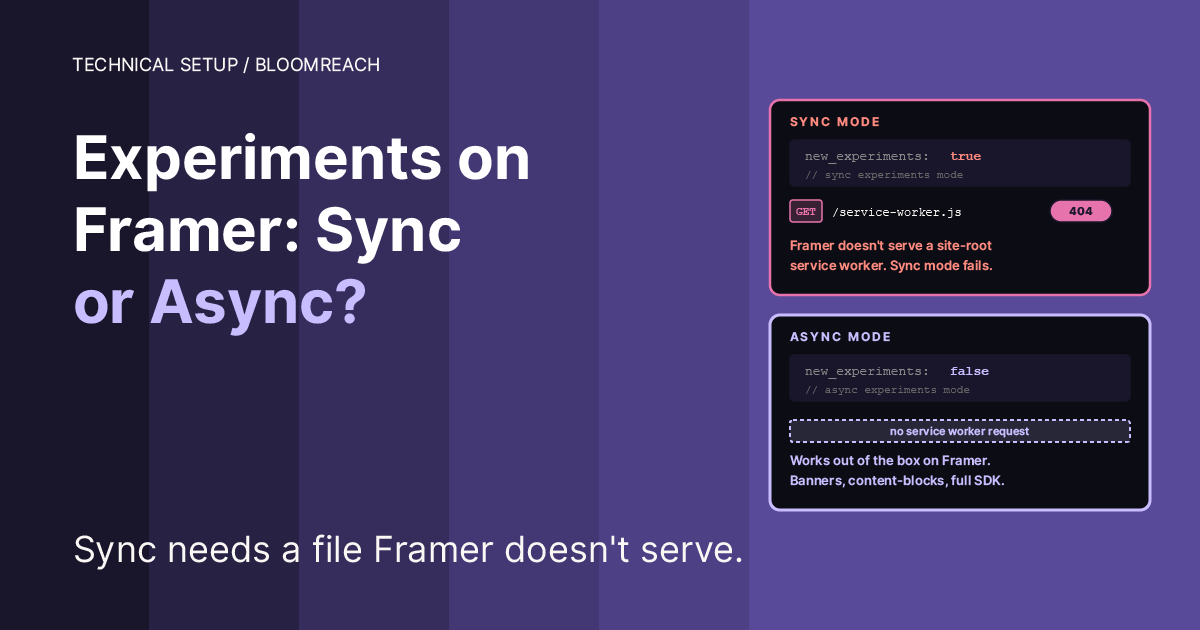
The Bloomreach Engagement SDK loader has two experiment modes. One of them needs a service worker file at your site root. Framer doesn’t serve one. Here’s why the default snippet throws a 404, what the two modes actually trade off, and how to pick the right one.
The error
Ship the Bloomreach Engagement SDK snippet from Bloomreach’s Web SDK installation page to a Framer site, open DevTools → Console, and you may see:
The first message is a 404. The second is the SDK telling you it’s already handled the failure and fallen back to async mode. In most setups nothing is broken from the user’s perspective, because the SDK falls back to async mode: tracking works, and experiments work. The console still looks alarming, and the 404 will show in any error-monitoring tool you have wired up.
Why the SDK tries to register a service worker
Bloomreach’s default installation snippet includes this config block:
“Sync” experiments are Bloomreach’s anti-flicker option for web experiments. When a variant is assigned, the modifications should apply before the page renders, so the visitor never sees the original variant briefly flashing before it’s replaced. The SDK achieves this by using a service worker to intercept the page response and inject variant markup before the browser paints.
For the service worker route to work, the SDK expects to find a service worker file at the site root, typically /service-worker.js. The file is small, but it must be served from the same origin and reachable by a simple GET. On most platforms you either write it yourself or copy one from Bloomreach’s docs into your public assets folder.
Why Framer can’t serve one
Framer is a hosted site builder with a managed asset pipeline. You add files through the Framer editor and they show up under your domain. But Framer does not give you an arbitrary file upload slot at the site root for a raw service-worker.js. You can add custom code to the <head>, you can add images and fonts, you can configure redirects, but you cannot drop a JavaScript file at https://yoursite.com/service-worker.js that a service worker registration call can fetch.
The result: when the Bloomreach SDK tries to register a service worker in sync mode on a Framer site, the browser hits Framer’s 404 page instead of a service-worker script, fails the registration with a HTTP response code error, and the SDK logs the failure before falling back to async mode.
It is Framer doing what it’s supposed to do. Framer never promised a raw file-upload slot at root, and a service worker registered on a hosted site would be an unusual capability to hand to customers without a managed interface. The SDK is also doing what it’s supposed to do: it tries sync first, logs why it couldn’t, and continues with the safer async path.
The mismatch is the default snippet, not either platform’s behavior.
What sync actually buys you, and when it matters
Before you decide which mode to use, understand what the two modes actually differ on.
Sync mode applies experiment modifications inline during the initial page render via a service worker intercept. Visitors never see the original content flash. Anti-flicker is as complete as it gets on the client side. The cost: service worker registration, a same-origin service-worker.js file, and the small startup overhead of the first-request intercept.
Async mode loads the experiment modifications alongside the SDK and applies them after the DOM is ready. There is a brief theoretical window where the original content could render before being replaced, typically under 100ms on a fast connection. In practice, Bloomreach’s async path uses a CSS hide-class (xnpe_async_hide with opacity: 0 !important) to visually suppress the element until modifications land, then removes the class. Users see a very short, usually imperceptible, opacity transition. No flash of the original content.
For most sites, the user-perceptible difference between sync and async is near zero, but test on your actual page, especially for above-the-fold experiments where a brief flash is more visible. The xnpe_async_hide CSS guard is doing most of the work that the service worker does in sync mode. You pick sync only if:
You’re running high-stakes conversion experiments where an 80ms flicker risk is measurable in test integrity
Your experiments modify critical above-the-fold content and your pages render slowly enough that async mode has a visible flash window
Your stack is a traditional server-rendered site where you have full control over file placement and can serve the service worker natively
If none of those apply, async is the right choice. Fewer moving parts, no file that could silently stop serving, no 404 to monitor.
The config change
In the exponea.start() configuration or the equivalent options object passed to the SDK loader, change:
To:
That is the entire fix. One word. The SDK stops trying to register a service worker, no more 404, no more fallback log.
Keep the non_personalized_weblayers setting you already have (we recommend setting it to true for GDPR posture, as non-personalized layers don’t require analytics consent to render). Keep the xnpe_async_hide style block in your tag body if it was there; it’s what makes async mode visually clean.
Here’s a typical configuration block showing the fix in context:
The corresponding HTML/CSS guard for async mode:
Bloomreach’s loader adds xnpe_async_hide to the <html> element as soon as the SDK boots, holds it there until experiment modifications are applied (with a timeout fallback of 4 seconds, the new_experiments.timeout default, so the page doesn’t stay invisible on SDK failure), then removes it. Put the style block above the <script> that loads the SDK so it’s ready before the class gets applied.
Verification
Publish the change and hard reload the site.
Console. The Failed to register a ServiceWorker error and the will now use async mode informational log should both be gone.
Network tab. There should no longer be a request to /service-worker.js. The SDK still fetches exponea.min.js and modifications.min.js (or the async variant) from your Bloomreach tenant domain, same as before.
Application → Service Workers (DevTools). Should show no service worker registered for your origin. If an old one is still listed from a previous deployment that actually succeeded, unregister it manually.
Experiments still working. Open a page where you have an active Bloomreach experiment, confirm the variant is applied. If you want to be thorough, disable the SDK temporarily and confirm the original version of the page renders cleanly, then re-enable and confirm the variant replaces it. On most Framer sites, the async fallback renders cleanly enough that end users won’t notice the mode change.
When to keep sync mode anyway
The honest answer: on Framer, async should usually be the default, unless you control the fronting infrastructure and have a clear reason to support sync. The platform doesn’t support arbitrary root-level file placement, so sync’s requirement cannot be satisfied cleanly. Even if you found a workaround (a serverless function, a Cloudflare Worker in front of your Framer site, a redirect trick), you’d be adding infrastructure to gain a 50-100ms anti-flicker improvement that the xnpe_async_hide CSS guard already mostly covers. Treat any such workaround with care: a service worker controls the entire origin scope and is security-sensitive, so it is not a casual patch.
On self-hosted sites, custom Next.js or Nuxt apps, or any stack where you can put a file at /service-worker.js, sync mode is a reasonable default for high-traffic retail or media sites running many concurrent experiments. Pick sync if your conversion tests genuinely need flicker-free rendering and you’re willing to own the service-worker file as a piece of your deployment.
Troubleshooting
Experiments aren’t running after switching to async. Check that modifications.min.js (or modifications-async.min.js) loads without error in the Network tab. If it’s blocked, check your CSP headers to confirm your Bloomreach tenant domain is on the allowlist.
Page shows a brief opacity flash. The xnpe_async_hide CSS style block isn’t in the page. Add it above your SDK loader. If you’re embedding via GTM, put it inside the same Custom HTML tag body.
Service worker is still registered from a previous deployment. Chrome DevTools → Application → Service Workers → Unregister. On first page load after unregistering, the new async-only code takes over.
Failed to register a ServiceWorker error still appears. Two possibilities. Either the config change didn’t publish (confirm in GTM Preview or by inspecting the live page source for mode: "async"), or a second tag on the page is running the loader with mode: "sync" in parallel. Audit Tags view for any other tag containing exponea or new_experiments.
The bigger picture
Bloomreach’s installation snippet is written for a general audience that includes stacks where service workers at site root are trivial to deploy. Framer is a specific case where that assumption breaks, and the breakage looks scary in the console even though nothing is user-visible wrong.
On any managed site-builder platform (Framer, Webflow, Squarespace, and similar), root-file and service-worker support differs, so verify whether root-level service-worker files are supported before using sync mode. Check the default installation snippets of any third-party SDK for service-worker registration, PWA manifest expectations, or root-level file requirements. Replace them with the SDK’s hosted-platform alternative where one exists. The gain in console clarity and error-monitoring signal-to-noise is worth the five minutes of reading the SDK docs.
We run Bloomreach Marketing (Engagement) on Framer ourselves and configure this for clients as a Bloomreach partner.
Read next
Your Framer Cookie Banner Looks Compliant. It Isn’t.: the consent setup all BR tracking depends on
Loading Bloomreach Marketing (Engagement) Outside GTM: architecture for loading the BR SDK ahead of GTM’s waterfall
Fix the Bloomreach Marketing (Engagement) SDK Double-Load Warning in GTM: the sibling fix when the same SDK loads twice under Consent Mode queuing
Custom Tracking Domain in Bloomreach Marketing (Engagement): how to make BR cookies survive Safari ITP
WRITTEN BY

Jan Sacha
Co-Founder · Bloomreach Consultant
Bloomreach Marketing (Engagement) consultant, in his third year at Asteroad running daily CDP and marketing automation work for European clients. Former Exponea enterprise consultant and CEO of Digiline.


Rather have us set it up for you?
Every manual here comes from real implementation work. If you would rather hand it off, tell us what you are trying to set up. We will listen first. No pitch, no commitment.