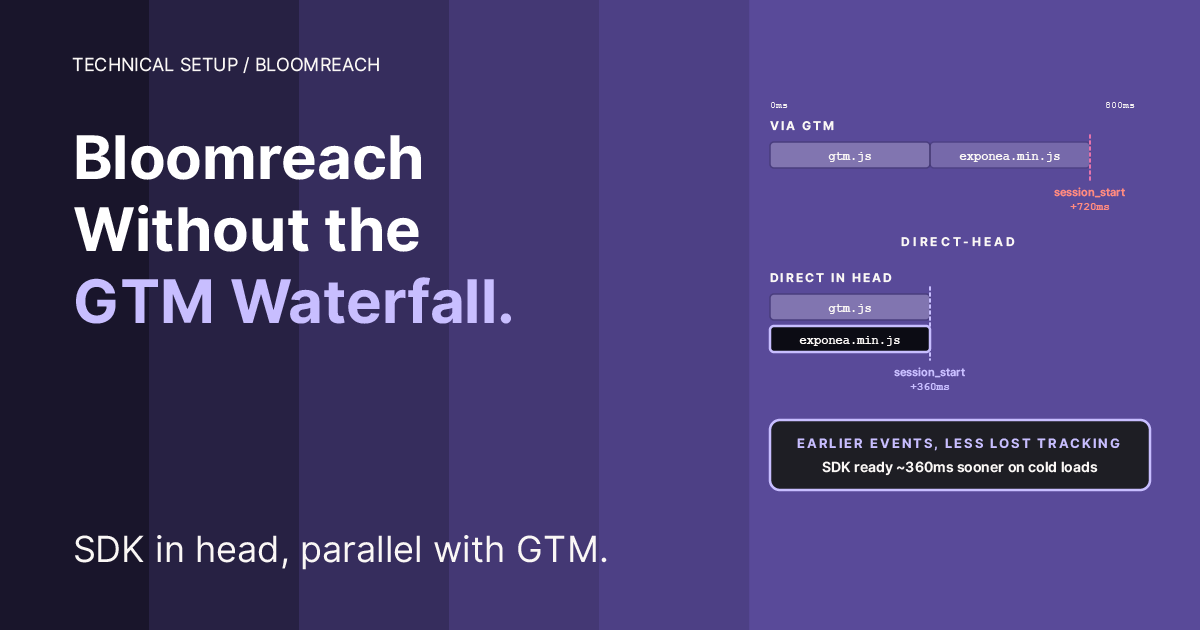
Most Bloomreach Engagement installations load the SDK through Google Tag Manager. It works, but it introduces a waterfall that delays session_start and early events. Here’s the direct-head pattern that makes BR load in parallel with GTM, when it’s worth the migration, and the safe transition sequence.
The default install, and why it’s usually fine
Bloomreach’s Web SDK installation page offers two integration paths. Paste the snippet directly into the page <head>, or wrap it in a GTM Custom HTML (or Custom Template) tag and let GTM fire it. Most sites choose the GTM path because that’s where consent orchestration, tag sequencing, and marketer-editable tracking already live. Bloomreach supports both, and for most sites the GTM path is a reasonable default.
For a low-traffic site with modest performance requirements, the choice between GTM-loaded and direct-head is mostly aesthetic. The waterfall adds maybe 100 to 300 milliseconds to SDK init time, first-session events are slightly delayed, and basic page-view and session-start tracking still works correctly. Nothing is visibly broken.
The waterfall, and when it matters
When you load any third-party SDK via GTM, the browser works through a chain of dependent requests. The main document parses, hits the GTM snippet, fetches gtm.js, parses that, reads the container config, identifies matching tags, fetches the SDK script referenced by each tag, and finally runs the tag body that initializes the SDK. Each hop adds a few dozen to a few hundred milliseconds. In the best case (warm cache, fast connection, Consent Mode pre-granted) you lose maybe 100ms. In the worst case (cold cache, slow connection, consent-queue release after banner interaction) you can lose multiple seconds.
During that window, the SDK isn’t tracking anything. session_start hasn’t fired. page_visit hasn’t fired. If the user clicks, scrolls, or bounces before the SDK is ready, those interactions go missing. You still get the session, just with a truncated first impression of it.
The session still starts. Analytics still records the page. The visit is still attributed. What’s missing is the first fraction of a second of customer signal, clicks, scroll depth, impressions above the fold, hover behavior on hero CTAs, that BR could have seen if the SDK had been ready. A truncated first impression of the session, not a missing session.
Whether that matters depends on what you do with the data.
Tier guidance: when the migration is worth doing
Tier 1: minor value. Small site, low traffic, no conversion experiments above the fold, no warehouse joins. The GTM default is fine. The direct-head migration gives you cleaner architecture and a marginal timing improvement, but nothing that shows up in revenue or campaign performance. Don’t migrate, or migrate only if you want the reference-implementation integrity on your own site.
Tier 2: real operational value. Moderate traffic, some BR experiments, occasional cross-tool analysis between BR and GA4. The direct-head pattern gives measurable improvement on session_start timing and better data quality for early-interaction attribution. Worth doing, measurable delta, not urgent.
Tier 3: meaningful revenue impact. High-revenue retail, subscription, travel. Running BR experiments on hero areas and above-fold CTAs. Safari-heavy traffic where ITP already caps identity stability and every missed early event compounds. Warehouse joins or reverse event flow to GA4 via the Measurement Protocol. Here the waterfall cost is measurable in conversion-data quality and campaign optimization precision. Migrate.
Ask the client: do you run experiments on content the visitor sees in the first two seconds? do you care about first-interaction attribution? is Safari a meaningful share of your traffic? If yes to any, you’re at least Tier 2.
What you keep in GTM, what moves to the Head
The direct-head pattern isn’t "rip out GTM." It’s a targeted move of one SDK loader. Everything else stays.
Move to the site’s <head>:
The Bloomreach Engagement SDK loader and
exponea.start()initialization
Keep in GTM:
Google Analytics 4 / Google Tag (all pages)
Hotjar or similar session recorders: the waterfall argument is weaker for them because they’re not as first-event-sensitive as a CDP SDK
Consent Mode v2 defaults and orchestration
Any custom
exponea.track('event_name', {...})calls that a marketer might want to edit, sequenced to fire after BR’s internalsession_start
The result is a hybrid architecture. SDK in head (fast, in control), event calls in GTM (marketer-editable, consent-gated via the existing GTM flow).
The implementation
Use a project-specific flag name if you run multiple BR projects on the same page. __brEngagementInitialized is clean for one-project sites. For collision-sensitive setups, scope it: __clientnameBrInitialized, __brProjectABC123Initialized.
This block goes as early in the <head> as possible, so the SDK starts downloading ahead of GTM. On any stack, the only requirement is that window.dataLayer and Google Consent Mode v2 defaults are declared before or just after this script parses.
Where the Head code goes, by platform
The pattern is delivery-agnostic. The code is the same on every stack; only the insertion point changes.
Next.js / React. Put the block in a Script component with strategy="beforeInteractive" inside your _document.tsx (Pages Router) or in the root app/layout.tsx via next/script (App Router), above the GTM script. Or, for the simplest delivery, inline it in a custom <Head> component rendered on every page.
Nuxt / Vue. Use app.vue's <script> setup with useHead({ script: [...] }) from @unhead/vue, or add it to nuxt.config.ts under app.head.script with tagPosition: 'bodyOpen' (or head, before GTM).
WordPress. Hook it into wp_head with a priority of 1 (very early) from your theme’s functions.php, or via a lightweight plugin. Keep it above the GTM snippet that other plugins inject.
Shopify. Paste it into theme.liquid inside <head>, placed above the GTM <script> tag that Shopify or your theme includes.
Webflow. Project Settings → Custom Code → Head Code. Paste at the top of the Head Code area, above the GTM snippet.
Framer. Site Settings → Code → Add → set Placement to Start of <head>, then drag the entry above the GTM entry in the list. We confirmed the served order on our own site on September 6, 2026: the Bloomreach entry appears in the HTML ahead of the GTM entry. Source order is not request order, and on that run the container was requested at 67ms and exponea.min.js at 115ms, both inside the first wave. What the ordering buys you is that the loader is parsed before the container, not that it always wins the race. Entry size is not a constraint: on the same date a single entry took 15,002 characters and saved intact, so split the BR loader and the GTM block into separate entries for readability, not for a limit.
Vanilla HTML / server-rendered sites. The literal <head> of your page template, immediately after the Consent Mode v2 defaults script and before the GTM loader.
In every case, the JavaScript is identical. The consent listener hooks dataLayer, which is the same object across every site running GTM with Consent Mode v2.
How the consent listener works
The listener mirrors the shape of a standard Consent Mode v2 update push: gtag('consent', 'update', { analytics_storage: 'granted', ... }). That push lands in dataLayer as an arguments object with [0] === 'consent', [1] === 'update', and [2] being the consent state object. The granted() helper matches that shape and requires analytics_storage === 'granted' specifically.
Both visitor paths flow through this matcher. A returning visitor with stored consent: the site or consent tool calls gtag('consent', 'update', { analytics_storage: 'granted', ... }) early in the page lifecycle.
One platform will not do that on its own. Framer's cookie banner pushes an update when the visitor changes something, but on a return visit it replays the stored choice as a consent default instead, and gtag discards a default that arrives after the container has initialized. What else that same replay gets wrong is measured in Framer’s Cookie Banner Denies the Cookies It Calls Always Active. This matcher only looks for updates, so it never sees a grant, and the SDK never starts for anyone who consented on a previous visit. The fix is a GTM tag on Consent Initialization that reads Framer's stored choice and pushes it as an update. It is Step 3 of the Framer consent manual. Confirm it before blaming the loader: open the console and look for a consent update entry with analytics_storage: 'granted' in window.dataLayer. A fresh visitor who clicks Accept: the banner pushes the same shape. A fresh visitor who clicks Reject: the push carries analytics_storage: 'denied', the matcher returns false, BR stays off. The pre-consent window is fully gated: no exponea.min.js fetch, no cookies, no tracking beacons.
The two-phase structure (check existing entries, then wrap future pushes) handles ordering ambiguity. If the site’s banner code runs and pushes consent before your Head loader parses, step 1 catches it. If your Head loader parses first (typical on most stacks), step 2 installs the wrapper and waits.
Migration sequence from GTM-loaded to direct-head
The safe transition uses the guard to allow a temporary overlap window where both loaders are active. Whichever initializes first sets the flag, the other bails. You’re never in a state where BR runs twice, or where a typo in the new code takes BR offline entirely.
Add the Head loader. Keep the existing GTM Custom HTML (or Custom Template) tag active. Deploy the head change.
Verify single SDK load. Hard reload in incognito, accept consent, open Network tab, filter
exponea. Exactly one request toexponea.min.js. Check the timing column: it should fire very early in the waterfall, before most GTM-driven requests. That confirms the Head loader is winning the race.Pause the GTM Bloomreach tag. Don’t delete yet. Publish the GTM container so the pause is live for visitors.
Re-verify. Hard reload incognito, accept consent, same Network and Console checks. BR still loads once, console silent, Bloomreach Events view shows
session_startandpage_visitarriving within 10 to 15 seconds.After a day of stable operation, delete the paused GTM tag. Keep the
DOM Readyandcookie_consent_updatetriggers. Hotjar or any other GTM-loaded tool still uses them.
Verification
Network tab. Pre-consent: zero requests for exponea.min.js or any exponea subdomain. Post-consent: exactly one exponea.min.js request, firing in the first wave of network activity, not after the GTM container has loaded and evaluated tags. On our own Framer install on September 6, 2026 a returning consented visitor produced one request at 115ms, against 976ms for the container the cookie banner injects.
Console. Silent. No SDK is already available on the window warning (that was the GTM double-load pattern and it cannot recur now that there’s only one loader). No window.ga retry error (the track: { google_analytics: false } config handles that). No service worker 404 (the new_experiments: { mode: "async" } config handles that).
Bloomreach Events view. session_start arrives within a few seconds of consent acceptance. page_visit follows. Timestamps should be closer to the page’s navigation-start timestamp than they were under the GTM-loaded setup. On Tier 3 sites this delta is measurable; on Tier 1 sites it’s observable but small.
Cookies. Pre-consent: no __exponea_etc__ or __exponea_time2__ cookies. Post-consent: both are set on the first event that fires after exponea.start().
Troubleshooting
SDK never loads after consent. Most likely causes, in order: the Head snippet is placed too late in the document (it needs to be in <head>, not before </body>); the snippet is below the GTM loader when it should be above; a syntax error inside the pasted BR loader (open DevTools → Sources, find the live HTML, confirm the !function(...) is present and complete); the flag name conflicts with something else on the page.
SDK loads twice during migration. Expected during step 1 only, and the guard should prevent a second exponea.start() call even if both loaders parse. If you see the SDK is already available on the window warning, one loader is setting the flag too late. Confirm the guard is the very first thing inside both IIFEs. If the warning persists with the GTM tag paused, a third tag somewhere is also loading BR, audit the GTM workspace for any Custom HTML containing exponea.start.
Consent is granted but BR doesn’t start. Open Console, type window.dataLayer, look for a ['consent','update',{analytics_storage:'granted'}] entry. If it’s there, the listener didn’t catch it (check the script for typos in the granted() helper). If it’s missing, the consent tool isn’t pushing the grant in the expected shape, check that your consent update path calls gtag('consent','update',...) and not just a custom dataLayer.push({event:'...'}) alone.
Pre-consent cookies are being set. The Head loader is firing without waiting for consent. Confirm the IIFE has the early return branches; if the BR loader snippet is pasted outside the initExponea() function body, it runs at parse time instead of on consent grant.
When to stay with GTM anyway
The GTM default is the right choice when your team includes marketers who expect to manage tracking tags through the GTM interface and don’t have code-deploy access. When your consent setup involves enough tags that moving one out of GTM fragments the orchestration. When the deploy pipeline for the site’s head is slower than the deploy pipeline for GTM changes (uncommon, but true in some enterprise setups where code changes go through longer review cycles than container publishes).
The three GTM-focused manuals in this series exist for exactly those situations. They aren’t deprecated by this one. The pattern they describe is correct for the audience that stays in GTM, and that’s most of the Bloomreach customer base. The direct-head pattern is the architectural option when the timing matters enough to justify the move.
The broader point
Vendor installation snippets are written for a general audience. "Put it in GTM" works for most customers and produces no visible problems. The cost is a small, consistent timing penalty that most teams never measure and most sites never miss. The teams that do measure it, and the sites where the first 500 milliseconds of each session genuinely matter for revenue, outgrow the general-purpose install and move to a pattern that puts the SDK first in the boot order. The pattern in this manual is that move, done safely, with consent integrity preserved across the transition.
Work like this is what our client engagements look like in practice; the Popsa case study shows where it leads.
Load-order decisions like this are standard scoping questions for a Bloomreach implementation partner.
Read next
Your Framer Cookie Banner Looks Compliant. It Isn’t.: the consent setup all BR tracking depends on
Fix the Bloomreach Marketing (Engagement) SDK Double-Load Warning in GTM: the sibling issue when you stay in GTM
Bloomreach Marketing (Engagement) Experiments on Framer: Async vs Sync Mode: the service-worker 404 that the async-mode config in this loader also solves
Custom Tracking Domain in Bloomreach Marketing (Engagement): how to make BR cookies survive Safari ITP
WRITTEN BY

Jan Sacha
Co-Founder · Bloomreach Consultant
Bloomreach Marketing (Engagement) consultant, in his third year at Asteroad running daily CDP and marketing automation work for European clients. Former Exponea enterprise consultant and CEO of Digiline.


Rather have us set it up for you?
Every manual here comes from real implementation work. If you would rather hand it off, tell us what you are trying to set up. We will listen first. No pitch, no commitment.