The GA4 client ID is the browser-scoped identifier GA4 assigns to a device and stores in the `_ga` cookie. In Bloomreach it’s captured and written to a soft ID, so the same browser visitor can be matched across GA4 and Bloomreach for analysis and warehouse joins.
Category
Bloomreach Infrastructure, Analytics
Also known as
_ga value; GA4 client identifier
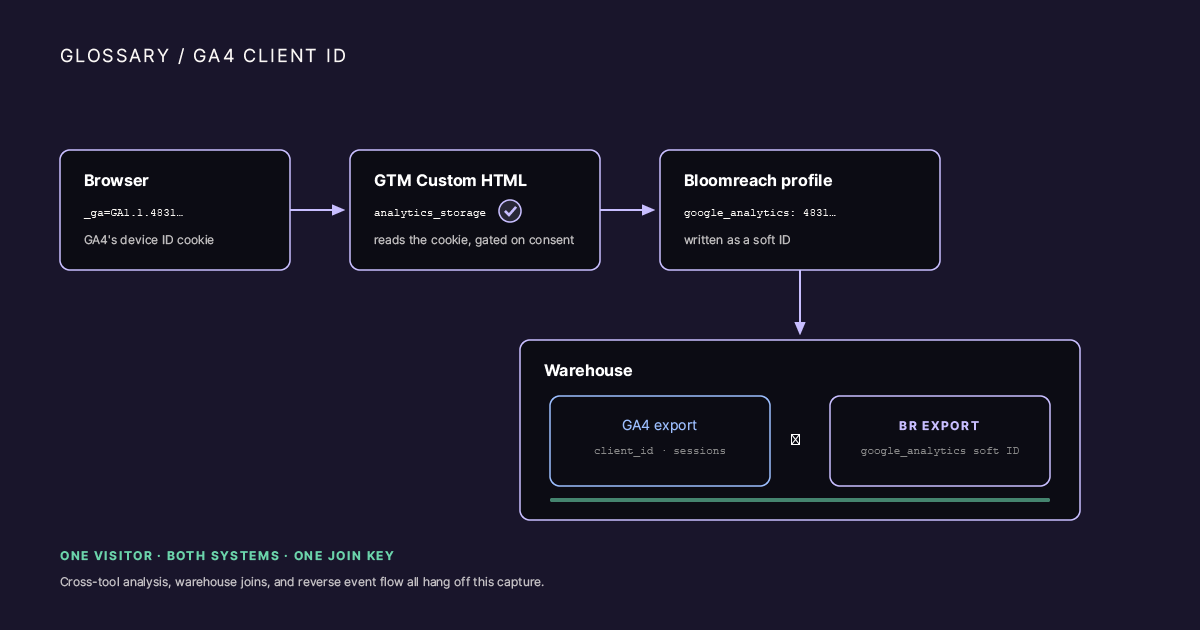
A browser _ga cookie on the left flowing through a GTM Custom HTML tag (with a consent-check gate requiring analytics_storage) into a Bloomreach profile's google_analytics soft ID slot. A second arrow continues to a warehouse icon showing a GA4 export and a BR export joined on the shared key.
Example
You’re running GA4 and Bloomreach side by side on the same site. The same visitors and sessions, but nothing on the Bloomreach profile says which GA4 client ID belongs to which customer. Warehouse joins become fuzzy, reverse event flow to GA4 loses session attribution, and analysts reconcile sampling differences by hand.
Bloomreach’s built-in Track GA Cookies option was meant to close that gap, but it was built for Universal Analytics. On a GA4-only site the SDK polls for window.ga, times out after 5.5 seconds, and leaves the google_analytics soft ID empty on every profile.
A practical fix is to capture it yourself: a GTM tag reads the _ga cookie, strips the GA1.1. prefix, and writes the value to the profile with exponea.identify({ google_analytics: clientId }).
How it’s captured
The capture is a Custom HTML tag in GTM, fired on two triggers OR’d together: DOM Ready, which catches returning visitors who already consented, and cookie_consent_update, which catches new visitors who just accepted. The tag’s Additional Consent Checks require analytics_storage to be granted, so it never runs for someone who denied analytics consent.
Two prerequisites are often missed. The google_analytics soft ID has to exist in the project’s customer ID schema first (Data & Assets, Customers, Customer IDs). And the legacy Track GA Cookies option has to be off, so the old and new mechanisms don’t both run.
What it does and doesn’t solve
It does: store the client ID as a soft ID, make warehouse joins between the Bloomreach and GA4 BigQuery exports exact on a shared key, and let you send Bloomreach events back to GA4 through the Measurement Protocol with correct attribution.
It doesn’t: solve cross-device identity, because the client ID is browser-scoped and lost when the user switches device or clears cookies; replace verified identity, which still needs hard IDs like email or account ID; or backfill old profiles, because this capture only works from the day you deploy it.
So it’s one specific piece of identity plumbing, not a customer-data strategy. It’s worth doing when you join GA4 and Bloomreach data in a warehouse, send events back to GA4, or run attribution across both. It’s skippable when the two tools never talk to each other.
In practice
Two failure points cause most of the trouble: the google_analytics soft ID slot doesn’t exist in the customer ID schema yet, or the legacy Track GA Cookies option is still on so the old and new mechanisms both run. Check both before writing a line of tag code.